Developing an OpenClaw Discord Emoji Skill - Implementing a User Approval Workflow
My experience developing a skill for an OpenClaw AI agent that detects Discord emoji reactions to capture user decisions, and uploading it to GitHub. I also share the problems I ran into during ClawdHub deployment and how I solved them.
This post was machine-translated from Korean by AI. Some expressions may differ from the original.
Read the original (Korean)Introduction
When you use AI agents, there comes a moment when you wonder, "Should I really let this run?" This is especially true for irreversible actions like posting tweets, sending emails, or deleting files.
So I built one: a skill that gets user approval through Discord emoji reactions.
📸 An example message in Discord with the 1️⃣ 2️⃣ 3️⃣ 🔥 ❌ emojis attached
Defining the Problem
I was building an automated crypto-market Twitter bot called "AlphaHunter" with OpenClaw. The AI collecting news and generating candidate tweets was fine, but the problem was that it must not post directly without approval.
Limitations of the existing approach:
- Using ✅/❌ emojis, they got cut off and weren't visible in Discord
- Hard to choose among multiple candidates
- Cases occurred where posts went out without approval
Solution: A Number-Emoji Approval System
Design Principles
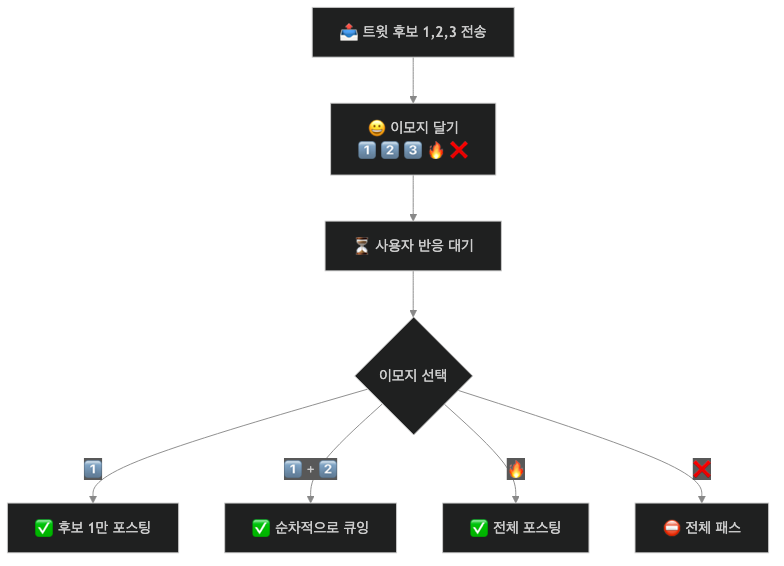
Implementation Code (approval_workflow.py)
class ApprovalManager:
    """승인 워크플로우 관리자"""

    EMOJI_MAP = {
        '1️⃣': 0,
        '2️⃣': 1,
        '3️⃣': 2,
        '🔥': 'all',
        '❌': 'reject'
    }

    def __init__(self):
        self.pending = {}  # message_id -> candidates
        self.approved = []  # 승인된 후보 큐

    def submit_candidates(self, candidates: list, message_id: str):
        """후보 제출 및 이모지 달기"""
        self.pending[message_id] = {
            'candidates': candidates,
            'submitted_at': datetime.now(),
            'expires_at': datetime.now() + timedelta(hours=24)
        }
        return self.EMOJI_MAP.keys()  # 달아야 할 이모지 목록

    def process_reaction(self, message_id: str, emoji: str):
        """이모지 반응 처리"""
        if message_id not in self.pending:
            return None

        action = self.EMOJI_MAP.get(emoji)
        candidates = self.pending[message_id]['candidates']

        if action == 'all':
            self.approved.extend(candidates)
        elif action == 'reject':
            del self.pending[message_id]
        elif isinstance(action, int) and action < len(candidates):
            self.approved.append(candidates[action])

        return self.approved
Discord Integration
Attach the emojis with OpenClaw's message tool:
# 후보 전송 후 이모지 달기
message_id = send_candidates_to_discord(candidates)

for emoji in ['1️⃣', '2️⃣', '3️⃣', '🔥', '❌']:
    message(
        action='react',
        channel='discord',
        messageId=message_id,
        emoji=emoji
    )
Uploading to GitHub
Once skill development is complete, you need to upload it to GitHub. An OpenClaw skill follows this structure:
skills/
└── discord-emoji-approval/
    ├── SKILL.md           # 스킬 문서
    ├── scripts/
    │   └── approval_workflow.py
    └── config.json        # 설정
Writing SKILL.md
# Discord Emoji Approval Skill

디스코드 이모지 반응으로 사용자 승인을 받는 스킬.

## 사용법

1. 후보를 디스코드로 전송
2. 이모지 5개 달기 (1️⃣ 2️⃣ 3️⃣ 🔥 ❌)
3. 사용자가 이모지 클릭
4. 승인된 후보만 실행

## 의존성
- OpenClaw message 도구 (react 액션)
Git Commit & Push
cd ~/.openclaw/workspace/skills/discord-emoji-approval
git add .
git commit -m "feat: 디스코드 이모지 승인 스킬 추가"
git push origin main
Attempting ClawdHub Deployment (Failed)
ClawdHub is the OpenClaw skill marketplace. You can share the skills you've built.
The Deployment Attempt
clawdhub publish ./skills/discord-emoji-approvalThe Error That Occurred
Error: Unable to connect to clawdhub.com
Status: 503 Service Unavailable
The service was temporarily unstable. I decided to try again later.
Alternative: Installing Directly from GitHub
If ClawdHub doesn't work, you can install directly from a GitHub URL:
# 다른 사람이 설치할 때
git clone https://github.com/arang/openclaw-skills.git
cp -r openclaw-skills/discord-emoji-approval ~/.openclaw/workspace/skills/
Lessons Learned
1. User Approval Is Essential
No matter how smart the AI is, a human needs to confirm irreversible actions.
2. Emojis Are Intuitive
A 1️⃣ emoji is much faster than the text "Choose option 1."
3. A Queuing System Is Needed
If you select several at once and run them simultaneously, you hit the rate limit. Sequential execution is safer.
4. Offline Fallback
In case an external service like ClawdHub is down, document the direct GitHub installation method too.
Wrapping Up
Thanks to this skill, the AlphaHunter bot went from being a "dangerous bot that tweets on its own" to a "safe bot that tweets only when a human approves."
Next time, I'll share my experience of actually using this approval system to build a self-improving AI agent.
Related Links:
Comments